SDWebImage
SDWebimage 支持webp 格式图片下载
(链接: http://pan.baidu.com/s/1dEtzO9z 密码: jd2h)
- 用github https://github.com/rs/SDWebImage 将SDWebimage clone 到本地
- 手动添加三方库 将SDWebImage工程下的 拷贝SDWebImage夹 添加 到自己的项目工程中
生成WebP.framework
- 下载libwebp
- 然后你需要先安装好有homebrew或者macports 安装homebrewh很简单,执行一条命令即可
ruby -e "$(curl -fsSL https://raw.githubusercontent.com/Homebrew/install/master/install)"- 以下用homebrew安装下面3个组件 autoconf/automake/libtool
// 1 安装autoconf brew install autoconf // 2 安装automake brew install automake // 3 安装libtool brew install libtool - 安装完成以后 进入到刚下载好的目录
cd libwebp - 然后执行命令
./iosbuild.sh - 开始编译WebP.framework
编译完成之后把这个framework添加到自己项目的工程里面
在Build Setting里面定义个宏Preprocessor Macros
SD_WEBP = 1
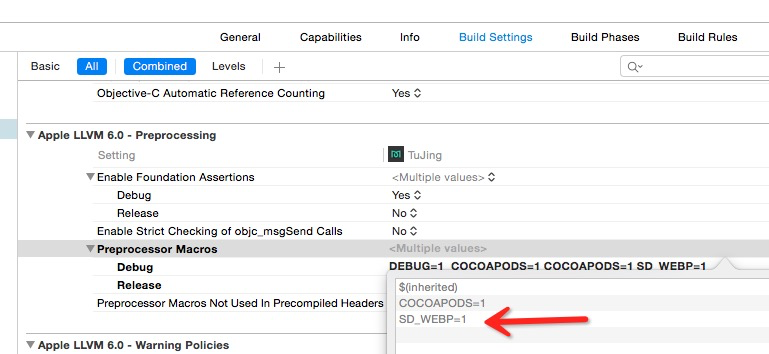
- 代码
- 以下用homebrew安装下面3个组件 autoconf/automake/libtool
#import "UIImageView+WebCache.h"

- (void)viewDidLoad {
    [super viewDidLoad];
    // Do any additional setup after loading the view, typically from a nib.
    UIImageView *image = [[UIImageView alloc] initWithFrame:CGRectInset(self.view.frame, 0, 250)];
    [image sd_setImageWithURL:[NSURL URLWithString:@"http://192.168.1.122/webp/20160127105012-AnyiZy73WE.webp"]];
    //    [image sd_setImageWithURL:[NSURL URLWithString:@"http://192.168.1.122/jpg/134948_960x340-007.jpg"]];
    //    image.backgroundColor = [UIColor redColor];
    [self.view addSubview:image];
}
若home-brew无法安装时 安装 macports
MacPorts使用
- 更新ports tree和MacPorts版本,强烈推荐第一次运行的时候使用-v参数,显示详细的更新过程。
sudo port -v selfupdate
或者
sudo port -d selfupdate
搜索索引中的软件 port search name
安装新软件
sudo port install name- 卸载软件
sudo port uninstall name - 查看有更新的软件以及版本
port outdated - 升级可以更新的软件
sudo port upgrade outdated - Eclipse的插件需要subclipse需要JavaHL,下面通过MacPorts来安装
安装可参考:sudo port install subversion-javahlbindings- 安装以下三个组件
sudo port install autoconf sudo port install automake sudo port install libtool - 安装完成以后 进入到下载好的libwebp工程目录下
在当前目录下执行 ./iosbuild.sh 命令编译生成WebP.framework静态库
注意:
利用cocoaPods 安装的 SDWebimage ,其中缺失 UIImage+WebP.h,UIImage+WebP.m 文件无法进行sdwebimage下载webt 格式的图片 参照以下方法 始终没有解决问题 下载webp 图片时崩溃 目前在使用CocoaPods来安装SDWebImage的情况下,支持webp格式的方式略绕,如下:- 在工程下新建LibWebP文件夹(Optional)
- 将https://github.com/seanooi/iOS-WebP下载下来,将里面的WebP.framework添加到LibWebP文件夹下
- 在主工程Build Phases的Link Libraries添加WebP.framework
- 将https://github.com/rs/SDWebImage下载下来,将里面的UIImage+WebP.h,UIImage+WebP.m添加到Pods下面的SDWebImage的Core目录下
- 将Pods-SDWebImage里面的-Build Phases-Headers-Project-添加UIImage+WebP.h
- 在Pods-SDWebImage里面的-Build Phases-Link Binary-添加WebP.framework
- 在Pods-SDWebImage-Build Settings-Preprocessor macros添加宏SD_WEBP=1启用webp支持
- 然后在使用webp格式的时候就能正常的使用了,如下:
[cell.imageView sd_setImageWithURL:[NSURL URLWithString:@"http://www.domain.com/path/to/image.webp"]];- 无效果,图片是灰色的。请检查SD_WEBP=1是否设置,见step6
- 报错,sd_imageWithWebPData unrecognize selector 。见step 4, step 5
- 报错,decode.h can not found。见step 2
- 安装以下三个组件
按照SDWebImage 官方介绍
pod 'SDWebImage/WebP'